
RECAP Support
What do you need help with?
Search your problem, or browse below. Most people find the fix without writing to us.
Common problems
only one side
too quiet
buzzing
not detected
adapters
Check your audio input first.
RECAP puts each voice on its own stereo channel — yours on one side, theirs on the other. That needs a stereo input, and most laptops only have a mono one. This is the single most common reason a recording comes back with half the call missing.
Run the Audio Device ScannerRuns in your browser. Nothing leaves your computer.
Common questions
Answered in full, right here — nothing to click open.
I can only hear one side of the call in my recording
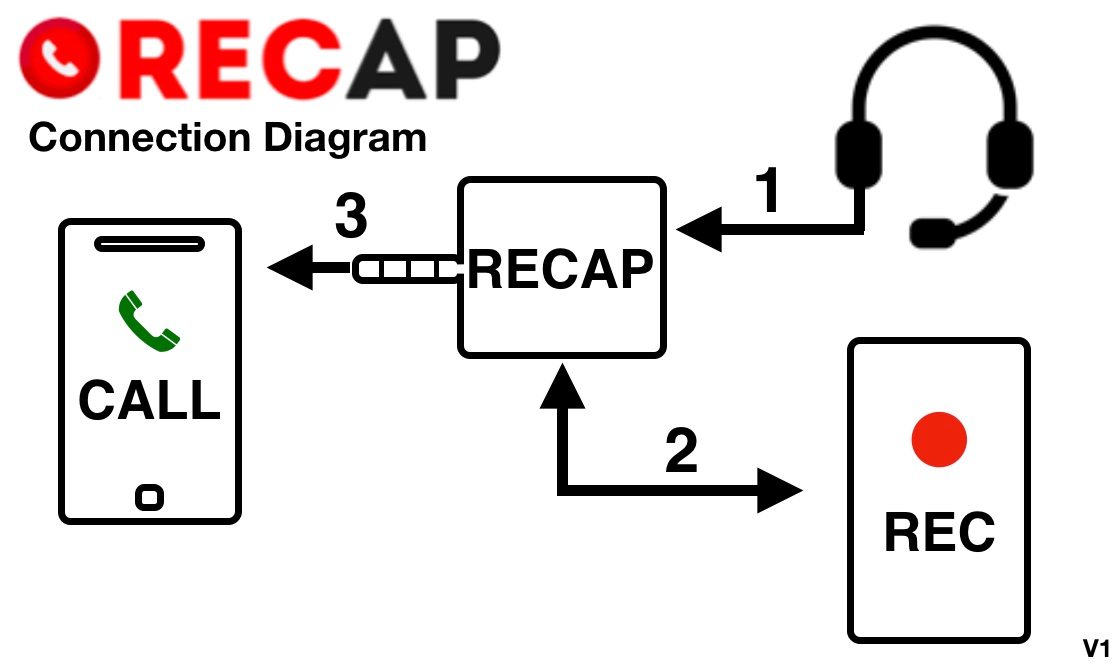
The most common cause is that your computer’s audio input is mono. RECAP sends each voice to a separate stereo channel, so an input that captures one channel gives you one side. Run the Audio Device Scanner to check. If it reports mono, you need a USB stereo audio adapter. If it reports stereo, check that RECAP’s CALL plug is in your phone’s headphone jack — not a HEADSET jack — and that your Lightning or USB-C adapter passes a microphone signal through.
Nothing was recorded at all
First check the file is really empty rather than one-sided — open it and look at both channels. If it is genuinely silent, work down the chain: RECAP must be connected before the call starts, the CALL plug must be in the phone’s headphone jack (not a HEADSET jack), and the recording cable must go into a microphone input that supplies plug-in power — not a line input. Your recorder must be armed and set to that input. RECAP never shows up as a device of its own: your computer sees the input it is plugged into. Run the Audio Device Scanner to confirm that input (or your USB audio adapter) is detected — if it does not appear there, the problem is the connection rather than the recording. If it appears, is selected, records nothing on a second attempt, and the cable and port are known good, that is the pattern worth writing to us about.
The recording volume is too low
Turn up your phone’s call volume during the call, and check your recording software’s input level. On a Mac, run the Audio Device Scanner and check whether auto gain control or noise suppression is active on your input; both can pull the level down.
There’s buzzing or static in the recording
Usually a ground loop or a low-quality adapter. Try disconnecting the phone charger while recording. If you’re using a USB-C or Lightning adapter, try a different one from the tested list. The Audio Device Scanner can also flag processing features — echo cancellation, noise suppression — that sometimes introduce artifacts.
My computer doesn’t detect my recording input
RECAP itself never appears as an audio device — it sends an analog signal, so your computer sees the input RECAP is plugged into: its microphone jack, or a USB audio adapter. Run the Audio Device Scanner to see every input your computer recognises. If your USB audio adapter doesn’t appear, reconnect it and try a different USB port. On a Mac, also check System Settings > Sound > Input to be sure that input, not the built-in microphone, is selected.
My phone doesn’t have a headphone jack
You’ll need a Lightning-to-3.5mm adapter for iPhone, or USB-C-to-3.5mm for Android. Not all of them pass a microphone signal through — see the compatible adapters guide before buying one.
Does RECAP work with Bluetooth headsets?
No — RECAP needs a wired connection. Your headset plugs into RECAP’s HEADSET port, and RECAP plugs into your phone’s headphone jack or adapter.
Can I use RECAP with a landline?
RECAP is built for cell phones. Landline recording needs a different kind of device — a telephone recording adapter.
Product help
Setup, operation, and troubleshooting for the hardware and the app.
Set up & connect
Didn’t find it?
Tell us what’s happening and we’ll take it from there. We read every message and answer as fast as we can.
Guides & articles
Longer reads from our blog. These are background and how-to pieces, not troubleshooting — if something is broken, search above or write to us.
Recording setups
On your computer
To a voice recorder
Choosing software
Android
iPhone
WhatsApp, Signal & Zoom
Both sides on a Mac
Zoom without a bot
Google Meet & Teams
Audio quality
Auto-record every call
Adjust microphone volume
Remove background noise
Fix clipping sound
After the recording
Transcribe a folder
Searchable library
Search past calls
Zoom, Sony & Olympus
Can ChatGPT transcribe?
Legal & by profession
US recording laws
International laws
Healthcare & HIPAA
Journalists
Lawyers
Podcasters
Small business
Researchers
Contact RECAP
Which best describes you?
So we ask for the right details, and only those.
Where is my order?
Three things answer most of these straight away.
Ordered in the last 5 business days?
Orders generally ship within five business days. Choosing Priority or Express changes the shipping method — it does not shorten that processing time. If you are inside that window, nothing has gone wrong yet.
Looking for your tracking number?
It is in the shipping confirmation email we send when your shipping label is printed — not the order confirmation. Search your inbox for RECAP, and check spam or Promotions.
Tracking hasn't updated?
Your tracking number exists from the moment the label is printed, before the parcel reaches the carrier. Until the carrier's first scan, tracking may only say Label created — that is normal while the order is still within the processing time above.
For international orders, a quiet stretch later on is usually normal too, rather than lost. Economy International has limited tracking in most countries — parcels often go quiet after leaving the US and only reappear on delivery. Priority Mail International and DHL Express track the whole way.
Still not right? Tell us and we'll look it up.


No order number? Leave it blank — we can find you by email.
Technical help
Start here — these four cover almost everything.
Nothing was recorded at allThe file is empty or silent, not just one-sided
The recording is too quietCall volume, input level, or auto gain control
Buzzing, hiss, or staticUsually a ground loop or a low-quality adapter
My computer doesn't see my inputThe jack or USB adapter RECAP plugs into, or the wrong input selected
Tried that and still stuck? Tell us what is happening.
Everything after the first four is optional — but the more of your setup we know, the likelier we answer in one reply instead of three. “Not sure” is a fine answer.
Refunds, warranty & wrong items
Where you stand, before you write anything.
RECAP does not offer refunds. All sales are final. What exists is a 30-day warranty against manufacturing defects, and a fix if we shipped you the wrong thing.
- Manufacturing defect, within 30 days of delivery — repair or replacement. We do not refund it.
- Wrong or missing item — covered, both directions paid. Report within seven days of delivery.
- Lost or damaged in transit — not refunded by RECAP. It is a claim you file with the carrier, and whether you have one depends on the service you chose: Priority Mail and DHL Express are insured, Priority Mail International covers up to $200, UPS Worldwide Expedited up to $100, and Economy International carries no insurance. Write in either way — we will tell you whether it is a carrier claim or ours, and help you file it.
- It doesn't work with my computer or phone — not covered; device incompatibility is excluded. Usually fixable though: run the Audio Device Scanner, and a USB stereo adapter solves a mono input.
- Changed your mind, or cosmetic marks — not covered. 3D-printed texture and layer lines are normal for the housing.
Full detail, including your rights under local consumer law, is in the Terms & Conditions.
Making a claim, or think your case is different?
Continue to a claimA person reads every one.
Before a defect claim
Warranty covers manufacturing defects — not a setup that needs a different adapter, which is the usual culprit. These two steps tell us, and usually tell you, which one you have.
- Run the Audio Device Scanner. It settles whether your setup is a supported one. If it reports mono, the hardware is fine and a USB stereo adapter fixes it — that is not a defect — and checking now saves you a claim round-trip.
- Work through the article for your symptom. nothing recorded, only one side, too quiet, buzzing or static, not detected. Note what you tried — the form asks.
A wrong, missing, or visibly damaged item needs none of this — say so in the form and skip straight past it.
Only the first five are required. On a defect claim the device details are how we tell a fault from a setup that needs a different adapter — leave them blank and our first reply will just ask for them. “Not sure” is a fine answer. Reporting a wrong or damaged item? Skip them. Photos help either way: reply to the confirmation email you'll get in a moment, which keeps everything on one thread.
Something else
We read every message and answer as fast as we can.
No order number to hand? Leave it blank — we can find you by email.
Considering RECAP
Tell us what you want to record and we’ll tell you honestly whether it fits.
Everything after the first three is optional.
Something else
Bulk orders, partnerships, press, or anything that doesn’t fit above.