

Phone manufacturers have spent years making it harder for apps to record calls. Apple blocks it entirely unless you accept a mandatory announcement. Android has restricted microphone access in every recent OS update. Cloud-based workarounds route your private conversations through someone else’s servers.
Call recording hardware sidesteps all of that.
A phone call recording device captures the analog audio signal directly from your headset connection — both sides of the conversation, every time, on every phone. No OS restrictions, no app permissions, no cloud dependency. Plug it in, press record, done.
Ships within 5 business days · one-time purchase, no subscription
Why Hardware Beats Apps for Call Recording
Software-based call recording has always been a workaround. Apps rely on OS permissions that phone manufacturers can revoke at any time — and they have, repeatedly.
The app problem on iPhone
- Apple’s built-in recording plays a mandatory announcement that cannot be disabled
- Built-in recording is blocked entirely in the EU and 20+ countries
- Third-party apps use a three-way calling trick — clunky, carrier-dependent, and your audio passes through their servers
- No app can record WhatsApp, Signal, Zoom, or any VoIP call on iPhone
The app problem on Android
- Google restricted call recording API access starting with Android 10
- Most recording apps now only capture your side of the call
- Apps that still work rely on accessibility services that Google is actively shutting down
What a hardware recording device solves
- Records both sides clearly — your voice and the caller’s voice
- Works on every iPhone and every Android, regardless of OS version
- Works with every calling app — phone calls, WhatsApp, Signal, Zoom, Teams, FaceTime
- No announcements, no tones, no notifications to the other party
- Your recordings never touch the cloud — they stay on your own device
- No monthly fees, no subscriptions, no accounts to create
How a Phone Call Recording Device Works
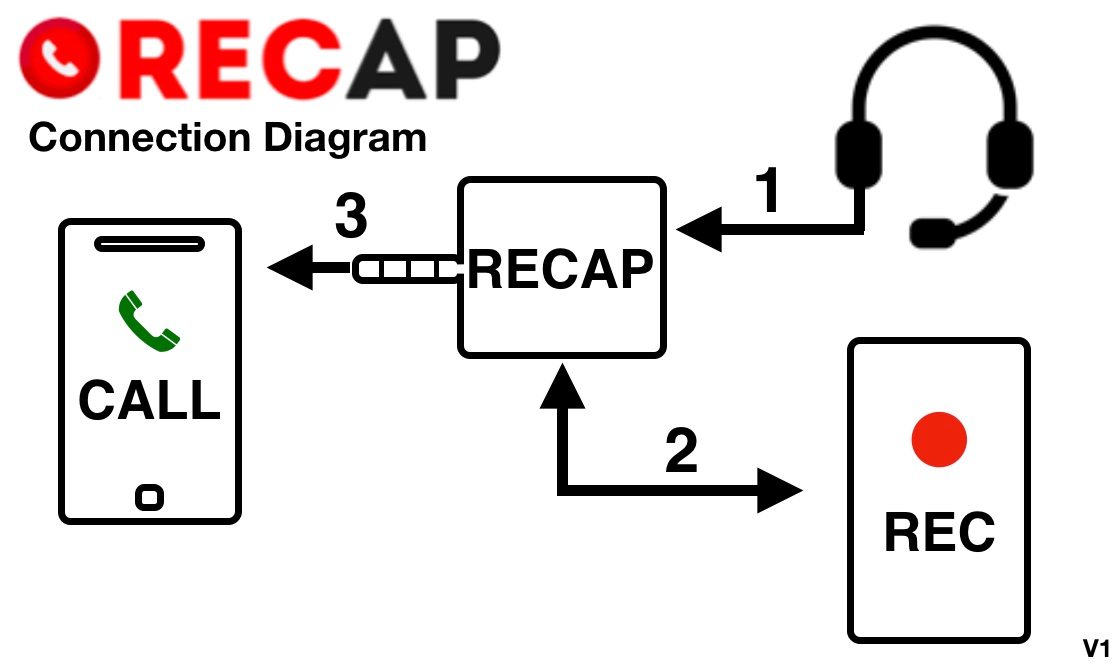
This device to record phone calls sits between your phone and your wired headset. It passes audio through normally so you hear the call and speak as usual. At the same time, it taps the audio signal and sends it to a separate recording device.
Here’s the signal path:
- Phone connects to the device via the headphone jack (or Lightning/USB-C adapter)
- Your headset plugs into the device — you talk and listen normally
- Recording output sends both sides of the audio to your computer, voice recorder, or tablet
No batteries needed. No software to install. No Bluetooth to pair. The device works purely from the audio signal — the moment you plug it in, it’s ready.
RECAP S2: Phone Recording Device ($99)
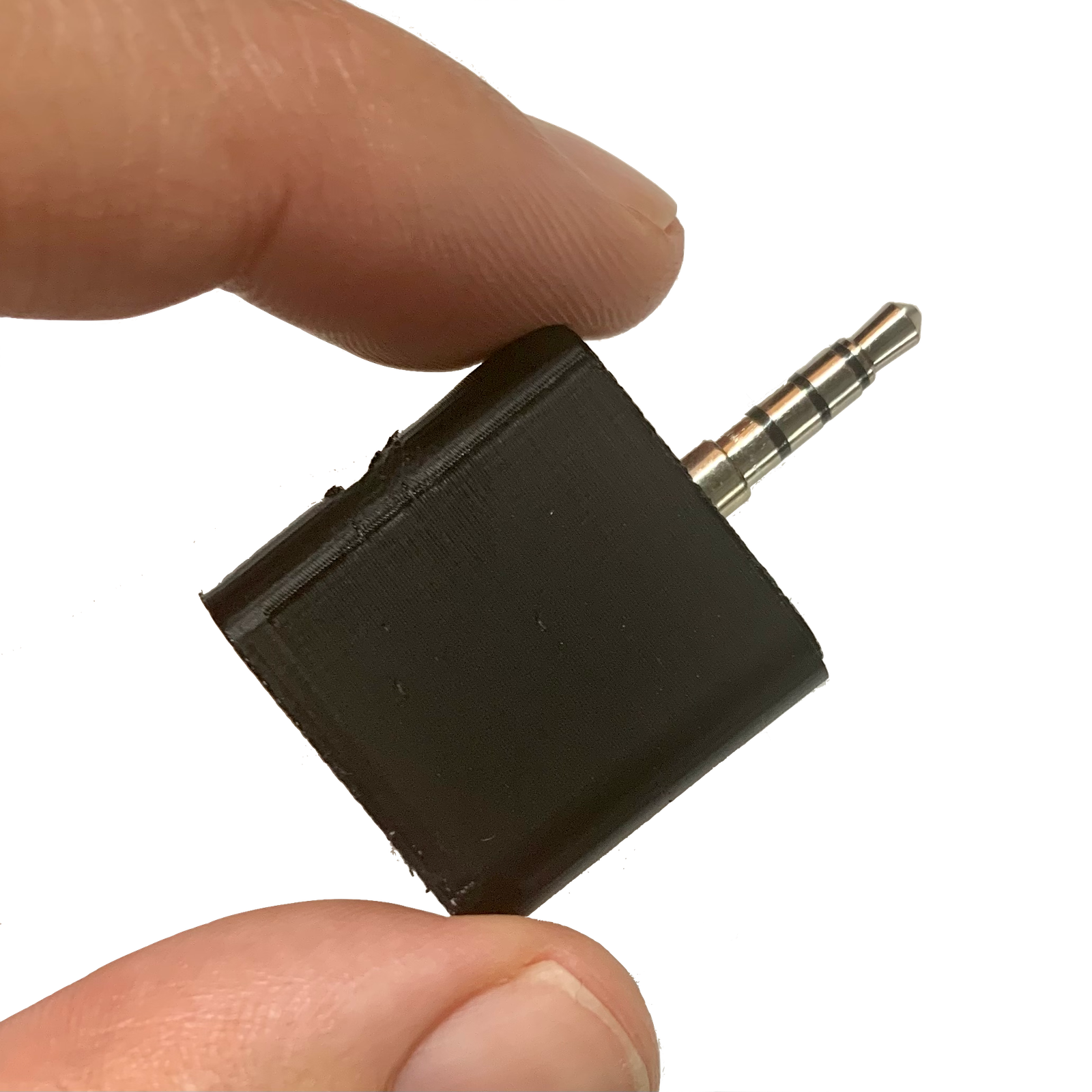
RECAP S2 is a palm-sized external call recorder designed specifically for recording phone calls. It’s been in production since 2013, shipped to 33 countries, and used by journalists, lawyers, researchers, healthcare providers, and the U.S. Department of Defense.
What you get
- A compact cell phone call recording device (smaller than a thumb drive)
- Works with every iPhone and every Android phone
- Records both sides of the call on separate stereo channels
- High-fidelity audio — captures the raw analog signal, not compressed software audio
- $99 one-time purchase — no subscriptions, no monthly fees, ever
What you need
- A wired headset (any earbuds with a microphone)
- A recording device — your computer, a digital voice recorder, a second phone, or a tablet
- For phones without a headphone jack: an Apple Lightning or USB-C to 3.5mm adapter (compatible adapters list)
How to Record a Phone Call with RECAP S2
- Plug RECAP into your phone’s headphone jack
- Plug your headset into RECAP’s headset port
- Connect RECAP’s record port to your computer or voice recorder
- Make your call — talk normally through your headset
- Press record on your recording device
That’s it. RECAP passes audio through transparently. The person on the other end hears nothing different.
What RECAP S2 Does
| Capability | RECAP S2 |
|---|---|
| Records both sides of the call, clearly | ✓ |
| Works on every iPhone (jack, Lightning, USB-C) | ✓ |
| Works on every Android phone | ✓ |
| Records WhatsApp, Signal, Zoom, Teams, FaceTime, regular calls | ✓ |
| No announcement, no tone, no notification to the other party | ✓ |
| Works in every country — no regional blocks | ✓ |
| Audio stays on your device — never sent to a cloud | ✓ |
| One-time $99 purchase — no subscriptions, no monthly fees | ✓ |
| Hardware-based — unaffected by OS updates or policy changes | ✓ |
Who Uses Phone Call Recording Devices
Journalists and podcasters record phone interviews with broadcast-quality audio. RECAP captures both sides on separate stereo channels — ideal for editing and post-production. Journalist recording guide · Podcaster recording guide
Lawyers and legal professionals document client calls, depositions, and witness interviews with recordings that hold up as evidence. No cloud servers, no third-party access to your files. Legal professional guide
Healthcare providers record patient consultations for accurate documentation without worrying about app compatibility or OS restrictions. Healthcare recording guide
Business and sales teams capture client calls, training sessions, and meeting notes without installing software on company phones. Business recording guide
Researchers conduct phone interviews and capture oral histories with professional-quality audio. Researcher guide
Anyone who needs a reliable record — insurance disputes, contractor agreements, or family calls you want to keep.
Compatible Phones and Setup
RECAP S2 works with every phone that supports a wired headset:
iPhones with 3.5mm jack (no adapter needed): iPhone 4 through iPhone 6s, iPhone SE (1st gen)
iPhones with Lightning (Apple adapter required): iPhone 7 through iPhone 14, iPhone SE (2nd and 3rd gen)
iPhones with USB-C (Apple adapter required): iPhone 15, iPhone 16, and all future USB-C models
As an iPhone call recording device, RECAP S2 works with every Lightning and USB-C model — no jailbreak, no workarounds.
Android phones: All models. Phones without a headphone jack need a USB-C to 3.5mm adapter.
Since RECAP is hardware, it works on every OS version — past, present, and future. No software updates can break it.
For the full list of tested adapters, see our compatible adapters guide.
What You Can Record To
Pick any recording device for phone audio — RECAP sends the signal to anything with a microphone input:
- Computer (Mac or PC): Use Audacity, GarageBand, OBS, or any recording software. Computer recording guide
- Digital voice recorder: Sony, Olympus, Zoom — any recorder with a 3.5mm input. Many support voice-activated recording for hands-free operation. Voice recorder guide
- Second phone or tablet: Use any voice recorder app — Voice Memos (iPhone), Easy Voice Recorder (Android)
- Professional mixer or audio interface: For broadcast or podcast production
Frequently Asked Questions
Can a phone call recording device record both sides of a conversation?
Yes. RECAP S2 captures both your voice and the caller’s voice because it sits in the audio path between your phone and your headset. Both sides of the audio signal pass through the device and are sent to your recording device. Unlike apps that may only capture one side, hardware recording captures the complete conversation.
Does a call recording device work with iPhone?
Yes. RECAP S2 works with every iPhone ever made. iPhones with a headphone jack connect directly. iPhones with Lightning or USB-C need Apple’s official adapter to 3.5mm. Because RECAP is hardware, it is not affected by iOS restrictions that block recording apps.
Is a phone recording device better than an app?
For reliability, yes. Apps depend on OS permissions that manufacturers can change. Apple blocks third-party call recording entirely on iPhone. Android has restricted recording access in recent updates. A hardware device captures the analog audio signal directly — it works regardless of OS version, carrier, or country. The tradeoff: you need a wired headset and a separate recording device.
Can I record WhatsApp and Zoom calls with a recording device?
Yes. Because RECAP captures audio from the headset connection, it works with any app that routes sound through wired headphones — WhatsApp, Signal, Telegram, Zoom, Microsoft Teams, Skype, FaceTime, Google Meet, and regular phone calls. This is a major advantage over iPhone’s built-in recording, which only works with the Phone app and FaceTime.
Is it legal to use a phone call recording device?
Recording laws vary by jurisdiction. In the United States, federal law allows one-party consent — you can record a call you are participating in. However, 12 states require all-party consent (California, Connecticut, Delaware, Florida, Illinois, Maryland, Massachusetts, Michigan, Montana, New Hampshire, Oregon, and Washington). Outside the US, laws vary by country. The recording device does not change your legal obligations — always verify your local regulations.
How much does a phone call recording device cost?
RECAP S2 costs $99 — a one-time purchase with no monthly fees, no subscriptions, and no accounts to create. Shipping is calculated at checkout.
Ready to record every call — both sides, high-fidelity audio?
Get RECAP S2 — $99, ships today | No apps. No cloud. No subscriptions.
Trusted by journalists in 33 countries. Shipped from Austin, TX since 2013.